


I approached Staples - Deals & Shopping as a practical shopping tool rather than a replacement for every way of buying office supplies. Developed by Staples Inc, this free shopping app is aimed at people who want to browse Staples products, look for savings, and manage a purchase from a phone. Its purpose is straightforward, but the real question is how comfortably it works for different people, routines, and abilities.
My overall impression is mixed in a useful way. The app can make a familiar Staples shopping trip more convenient, especially when I already know what I need. It is less convincing when I want to compare a wide range of retailers, move quickly through a large order, or shop with very specific accessibility needs. The experience depends heavily on how much product research I expect the app to handle for me.
How comfortably the shopping experience works
Readable browsing for quick decisions
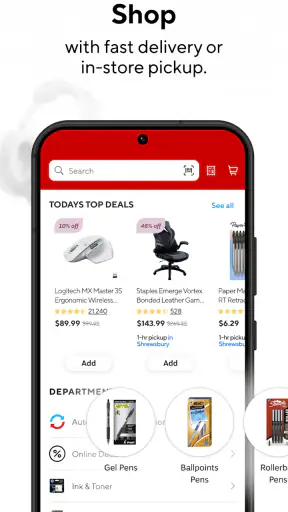
The basic shopping flow is easy to understand: search or browse, inspect an item, add it to a cart, and continue toward purchase. That familiar structure matters for people who do not want to learn an unusual interface. Staples is already a recognizable retail destination, so the app benefits from that context instead of asking users to decode an unfamiliar marketplace.
I found it most useful when I had a clear target, such as printer paper, folders, notebooks, or a desk accessory. A focused search reduces the amount of visual scanning required. If I was only trying to find one replacement item, the app felt more manageable than walking through a large store or opening several unrelated shopping sites.
Readability becomes more important during comparison. Product names, sizes, colors, pack descriptions, and prices can all affect whether an item is actually suitable. I would slow down at this stage rather than relying on a quick glance, particularly for supplies where a small difference in dimensions or quantity can make the purchase wrong.
My practical tip is to decide the exact product details before browsing. Knowing the paper size, notebook format, ink model, or quantity makes the interface work in your favor. Without that preparation, a long list of similar products can create unnecessary cognitive load, especially for someone who finds dense retail screens tiring.
Navigation is strongest when the task is already defined
The app makes more sense as a task-oriented tool than as a place to casually explore every possible office product. That is not necessarily a flaw. A parent replacing school supplies, a student looking for a specific binder, or a home worker restocking printer essentials may appreciate the directness.
On the other hand, browsing without a plan can feel less efficient than using a desktop browser with a larger screen. A phone gives less room for comparing several product cards and remembering what changed between one item and another. For users who need enlarged text or who prefer generous spacing, the compact format may mean more scrolling and more back-and-forth.
I would also separate product discovery from final checking. First, use the app to locate likely choices. Then inspect the item information carefully before placing it in the cart. This two-stage habit is helpful for anyone who has difficulty with visual detail, concentration, or short-term memory because it avoids making a purchase decision while still trying to understand the product list.
Useful for planned shopping, less ideal for open-ended research
Compared with visiting a physical Staples store, the app reduces walking, shelf searching, and the need to ask an employee where a product is located. That can be a genuine advantage for people who tire easily, have limited mobility, or simply want to avoid a busy retail environment.
Compared with a general marketplace, however, its strength is not necessarily maximum variety or the broadest comparison. A general shopping service may be better when I want to compare many brands, sellers, delivery options, and customer opinions in one place. Staples makes more sense when the retailer itself is the destination and I want a direct route to its catalog and savings.
Motor and sensory considerations during checkout
Shopping on a phone requires repeated taps, scrolling, text entry, and careful selection. For someone with limited dexterity, tremors, joint pain, or fatigue, those small interactions can become the hardest part of the experience. Searching for an item may be simple, but entering a long product name or correcting a mistake in a form can take more effort than expected.
I would use the phone's built-in keyboard assistance where available, and I would avoid rushing through the cart. A deliberate pause before each confirmation is worthwhile because retail interfaces often place similar controls close together. The app is more comfortable when I can use both hands, sit down, and complete the order without interruption.
Voice input may help with search terms or addresses on a compatible device, but I would still verify the resulting text. Office products frequently have model names, sizes, and abbreviations that speech recognition can misinterpret. The app should be treated as a visual shopping interface with possible device-level assistance, not as a guaranteed voice-first experience.
For sensory-sensitive users, shopping from home removes some of the noise, lighting, crowds, and competing announcements associated with a physical store. That is one of the app's clearest situational benefits. Yet a phone screen can introduce its own strain through glare, small text, repeated scrolling, or a dense product layout. Adjusting screen brightness, text size, and display settings at the device level may make a meaningful difference.
Where the app fits into different routines
A realistic example is a home worker who notices that printer paper and folders are running low late in the afternoon. Instead of making a separate trip, I can search for the needed supplies, compare the relevant details, and prepare the order from a chair. That saves physical effort and reduces the chance of forgetting the task while traveling to a store.
For a caregiver shopping on behalf of someone else, the app can also support a shared routine. One person can confirm the exact product requirements while another handles the phone. This division is useful when the person who knows the supplies best is not the person who finds phone navigation easiest.
A student with a short list may benefit from the same approach. Searching for a particular notebook or school item is less demanding than navigating several aisles. The limitation is that the student still needs to verify the details carefully; a visually similar product is not always an equivalent one.
For users who are deaf or hard of hearing, a visual shopping workflow may be more convenient than relying on spoken assistance in a store. For users with low vision, the experience will depend greatly on the device's display settings and the app's compatibility with the operating system's assistive tools. I would test the most important actions—search, product selection, cart review, and checkout—before depending on it for a time-sensitive purchase.
Rewards and savings require attention, not just tapping
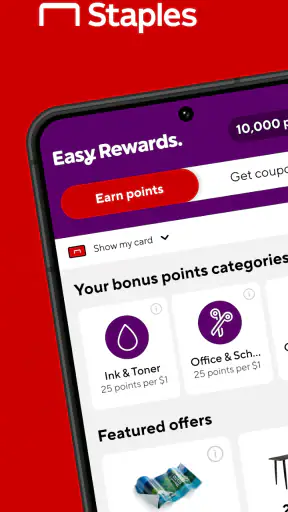
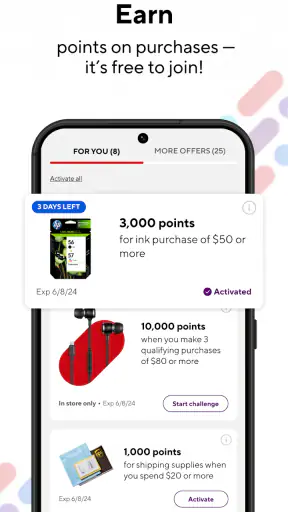
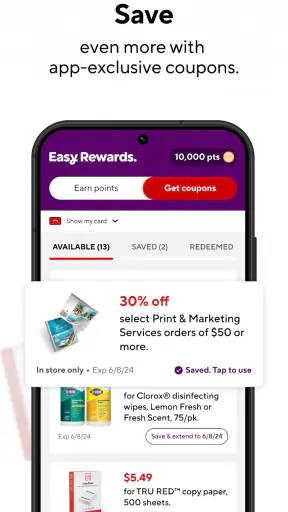
The app's “shop, earn and save” focus suggests that it is intended to connect purchasing with Staples savings activity. I see that as useful for regular Staples customers, but savings are only valuable when the conditions are clear and the reward fits something I was already planning to buy.
My advice is to treat a promotion as a reason to check an item, not as a reason to buy an unnecessary item. This is especially important for users managing a strict household, school, or small-business budget. A discount can still lead to overspending if it encourages a larger pack, an extra accessory, or a product that does not match the original need.
For someone who has difficulty remembering steps, I would keep the process simple: search for the planned item, review the offer connected to it, and check the cart before moving on. Avoid opening several promotional paths at once. The fewer decisions I make simultaneously, the easier it is to notice whether the final order actually reflects the shopping list.
What can still create barriers
The biggest barrier is not the idea of mobile shopping; it is the amount of detail that can be packed into retail decisions. Similar products may differ by size, format, compatibility, or quantity. A user with reading difficulties, attention limitations, or visual fatigue may need extra time to distinguish them.
Another barrier is the small-screen context. A phone is convenient, but convenience does not equal clarity. Comparing options side by side is generally easier on a larger display. If I am buying several related items or checking supplies for a workplace, I would prefer a tablet or computer when possible and use the phone for quick searches or a final purchase.
There is also a practical risk in assuming that a mobile order removes every part of the shopping process. I still need to understand the product, confirm the order, and make sure the selected option suits the intended use. Someone who needs personal guidance about compatibility or an unusual office setup may be better served by speaking with a store employee or using a retailer that offers more direct comparison support.
I would not recommend making this the only shopping method for a person who cannot comfortably read product information, operate small touch controls, or recover from an accidental selection without assistance. The app may work well with a trusted helper or suitable device settings, but that is different from promising that every user will find it independently accessible.
Device support and everyday expectations
The app is available for Android and iOS, with a minimum operating system requirement of Android 9. The current version is 15.0.1, so keeping the phone's software and the app itself reasonably current is sensible. A person using an older device should check compatibility before building an important shopping routine around it.
It is rated for Everyone, which fits a general retail tool rather than an app aimed at a narrow age group. That does not mean every screen will suit every reading level or ability. Age suitability and practical accessibility are different questions, and I would judge the latter through the actual shopping tasks I need to complete.
The app has passed one million installs and holds a 3.1 average from around 1.5 thousand ratings. Those figures suggest a sizable audience but also a fairly divided experience. I would not install it solely because it is popular; I would install it if Staples is already a retailer I use and the mobile shopping workflow matches my needs.
Who should use it, and who should choose another route?
I think it is a good fit for regular Staples shoppers, people who already know the products they need, and anyone who values avoiding a store visit for a straightforward restock. It can also suit users who prefer to shop from a quieter environment and who are comfortable checking product details on a phone.
I would be more cautious if I were buying an unfamiliar technical item, comparing many brands, or trying to solve a product-selection problem rather than simply completing a planned purchase. In those situations, a larger web browser, a general comparison service, or direct help from a store may be more efficient.
People with motor or visual limitations should consider the whole workflow rather than the search screen alone. Can they enter text, distinguish similar products, review the cart, and complete the final confirmation comfortably? If one of those steps is difficult, device-level accessibility tools or assistance from another person may be necessary.
My inclusive verdict
Staples - Deals & Shopping is most effective when it turns a known shopping task into a calmer, shorter routine. I like it for planned purchases, home restocking, and situations where avoiding a busy store matters. Its connection to Staples shopping and savings gives it a clear purpose, and the free price makes it easy to try without committing to a subscription.
My reservations are equally practical. A phone screen is not the best environment for detailed comparison, small controls may challenge some users, and promotional shopping can add decisions for people who need a very simple process. The app does not remove the need to read carefully or confirm that a product is genuinely suitable.
In the end, I would recommend it to a Staples customer who wants convenience and already has a reasonably clear list. I would not present it as the best option for every ability or every shopping style. Its inclusive value is strongest when the user can adjust the device, take the process slowly, and use the app for the part of shopping it handles best: finding and organizing a Staples purchase without requiring a trip through the store.


